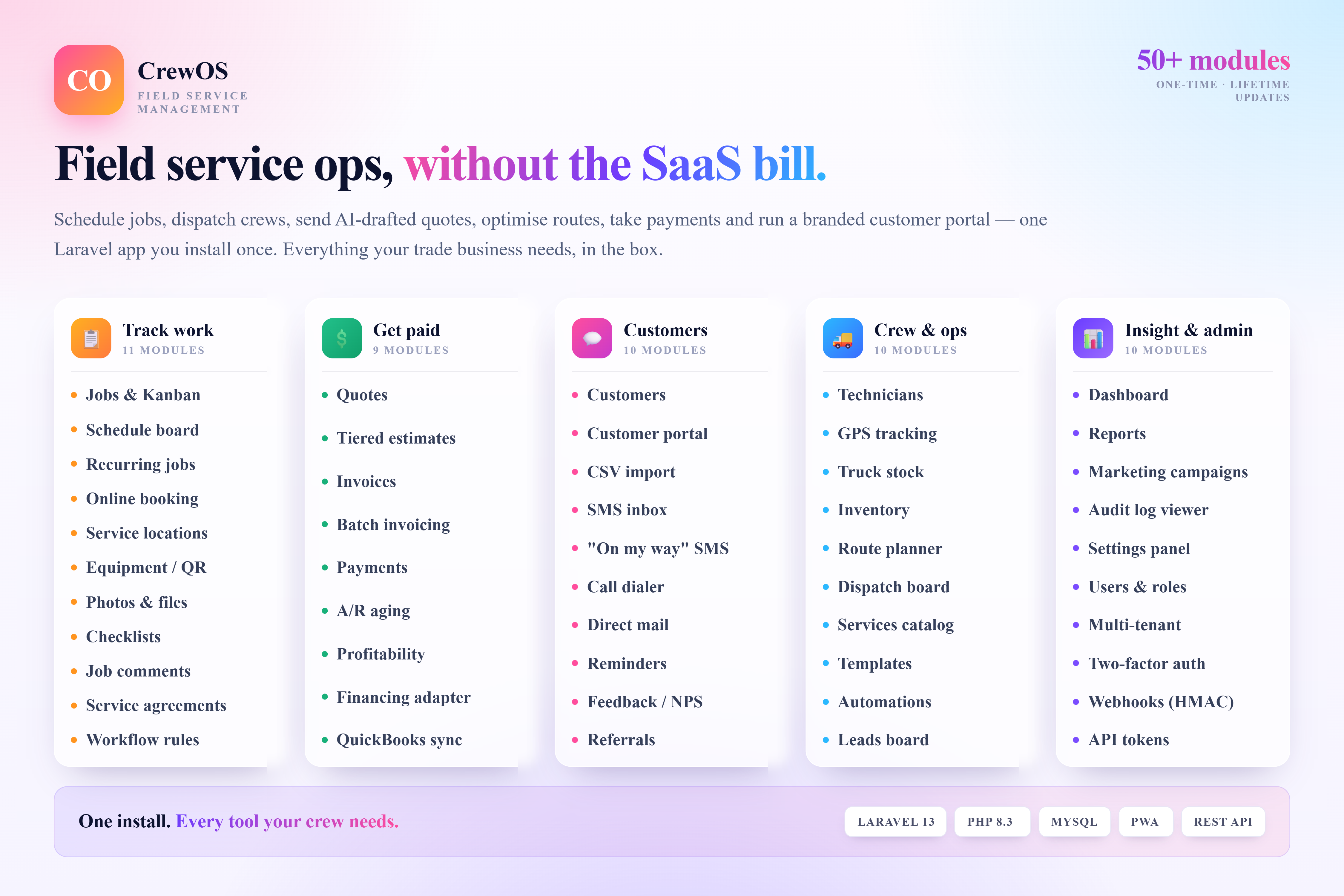
The whole job, from booking to paid, on software you own
Most field service businesses run on a stack of disconnected tools — a calendar app for the schedule, texts to the techs, a spreadsheet for invoices and a shoebox of receipts at tax time. CrewOS replaces all of that with a single, self-hosted field service platform that covers the entire job lifecycle: from the first booking, through scheduling and dispatch, the work on site, quotes and invoices, payment and the reports that tell you whether the job actually made money — all in one place you fully own.
It is built for service trades that hate SaaS pricing and want professional, contractor-grade tools without per-seat fees that climb every time you hire.
Why CrewOS
- You own it. Self-hosted on your own server, so your customer list, job history and pricing stay under your control — not locked inside someone else's cloud.
- One purchase, no subscriptions. A single license instead of a recurring per-technician, per-month bill that grows as your crew does.
- Minimal training. A clean, intuitive interface your office staff and techs can pick up in an afternoon, not a week.
Who it's for
CrewOS is designed for the people who actually run the trucks, not a sales floor:
- Plumbers and drain specialists
- Electricians and electrical contractors
- HVAC installation and service companies
- Landscape, lawn and grounds-care crews
- Any small-to-midsize trade running scheduled and recurring field work
A complete tour of what's inside
Jobs & kanban board
Every job runs through its full lifecycle on a status board, with a complete audit log of who moved what and when, per-job checklists, photos and files attached to a job timeline, and internal comments — so nothing falls through the cracks between the office and the field.
Schedule board & dispatch
A day view by technician lets you assign and dispatch jobs in seconds, with online booking through a public widget at /book that needs no login, so customers can request work themselves.
Recurring jobs & service agreements
Set weekly, biweekly, monthly, quarterly or yearly templates for repeat work, and turn annual service contracts into scheduled visits and predictable recurring revenue.
Service locations & equipment
Track multiple addresses per customer, each with its own equipment on site — model, serial number, install date, warranty and next service date — so a tech arrives knowing exactly what they're working on.
Quotes, tiered estimates & invoices
Build quotes with line items and tax and an accept/reject lifecycle, offer Good / Better / Best tiered estimates to lift your average ticket, and turn approved work into invoices with tax, discounts, tips and partial payments.
Payments, A/R aging & profitability
Track payments against invoices, watch what you're owed across Current, 1-30, 31-60, 61-90 and 90+ day buckets, and see job-level profitability — revenue minus labour and parts — so you know which work is actually worth doing. A one-way QuickBooks sync exports customers and invoices to your accountant.
Customers & portal
Keep residential and commercial customers with lifetime revenue and tags, import existing lists by CSV with a preview-and-validate step, and give customers a self-service portal with token URLs for quotes, invoices, equipment and feedback.
Communications
Reach customers where they are: outbound SMS through Twilio (with a logged fallback), one-click "On my way" ETA texts, click-to-call dialing with a per-customer log, printed or emailed direct-mail postcards, automatic reminders before scheduled jobs, post-job feedback and NPS forms, and a referral program with shareable codes and auto-issued rewards.
Technicians, GPS & routing
Manage techs with skills, hourly rates and a today-availability toggle, see them live on a GPS tracking grid, and plan efficient routes with a pure-PHP nearest-neighbour planner — no Google API key required.
Inventory & catalogs
Track stock levels with reorder alerts and quick +/- adjustments, and reuse a services catalog and email, SMS and job templates so quoting and dispatching stay fast and consistent.
Reporting, automations & admin
A dashboard surfaces today's jobs, open jobs, overdue invoices and month-to-date revenue, while reports cover revenue, jobs done, top customers and techs, profitability and aging. Workflow rules fire server-side ("when status = X, send Y"), an audit-log viewer filters by user, model, action and date, custom fields extend customers and jobs with no code, and role-based users, two-factor auth, HMAC-signed webhooks and a Sanctum-protected REST API round out the admin side.
A day with CrewOS
A homeowner books online through the public widget; the job lands on the schedule board and is dispatched to the nearest available tech, whose route is planned automatically. A one-click "On my way" text goes out with an ETA. On site, the tech works through the job checklist, snaps photos to the timeline, and sees the exact equipment on record for that address. The customer approves a Good / Better / Best estimate from their portal, the job is invoiced with tax and a tip, and payment is recorded. At day's end the dashboard shows the jobs done and the month's revenue, the profitability report confirms the job cleared its labour and parts, and the invoice syncs to QuickBooks — no spreadsheets, no shoebox.
Built on a modern, maintainable stack
CrewOS is built on Laravel 13 with Livewire 3, Tailwind CSS v4 and Alpine.js — a modern, well-supported stack that any Laravel developer can customise and extend. Authentication uses Fortify with optional TOTP two-factor, roles use Spatie permission, optional AI runs through Prism (OpenAI, Anthropic or Ollama), and it runs on MySQL, PostgreSQL or SQLite. The interface is responsive for the office and the truck, and a 5-step web installer at /install gets you live without touching the command line.
What you actually get
- Full Laravel 13 source code with no obfuscation, ready to read and adapt
- Database migrations and seeders with role and permission setup
- A 5-step web installer plus 9-page HTML end-user documentation
- 630+ Pest tests across Unit, Feature and Browser suites
- Tailwind v4 source with the Inter font and OKLCH brand tokens, plus pre-compiled assets
- A marketing landing-page template and commercial use rights under the Standard License
Try it before you buy
A live demo is available with ready-made logins for Admin, Manager, Dispatcher and Technician, so you can see exactly what each role sees before committing.
Pricing, support & guarantee
CrewOS is available under the Standard License for $59, with 6 months of author support included. Need longer? Extend to 12 months for +$8.85 or 18 months for +$14.75 at checkout. Every purchase includes lifetime access to free updates — and critical security updates ship to all license holders regardless of support status — backed by a 30-day money-back guarantee, so you can buy with confidence.
Frequently asked questions
Is CrewOS really self-hosted?
Yes — you install it on your own server (MySQL, PostgreSQL or SQLite) using the 5-step web installer, and keep full control of your data and source code.
Are there monthly fees?
No. It is a one-time purchase under the Standard License, with optional paid support extensions and free updates.
Do I need a Google API key for routing?
No — the route planner uses a pure-PHP nearest-neighbour algorithm, so there's no external mapping API to pay for or configure.
What if it is not right for me?
Every purchase is covered by a 30-day money-back guarantee, and you can try the live demo first.