

Your Author Profile and Storefront
Your author page is your storefront on AppTrovo. It gathers your products, reviews and background in one place and lets buyers follow you. You control what it says from the Profile page in the Author Panel.
Edit your author profile
In the Author Panel sidebar, under Account, open Profile. The Author Profile page manages the public profile that buyers and visitors see.
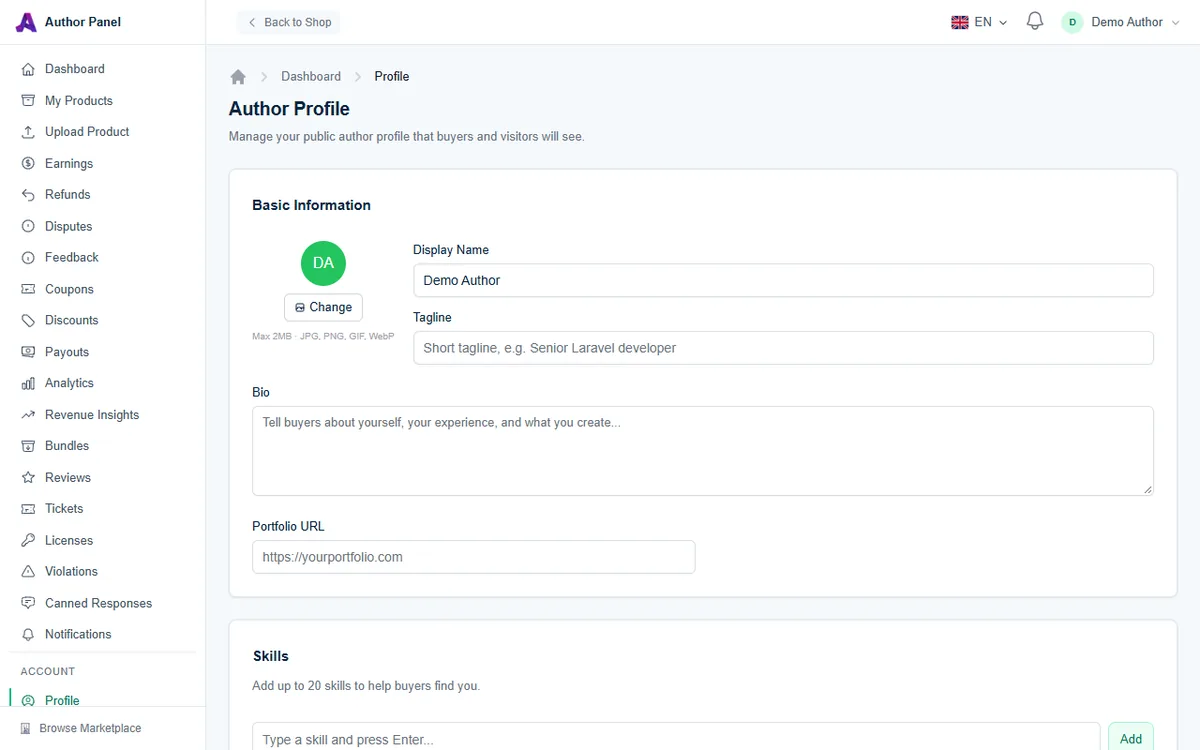
Basic Information
- Avatar: click Change to upload a picture (JPG, PNG, GIF or WebP, up to 2 MB). Without one, your initials are shown.
- Display Name (required, up to 100 characters): the name shown on your author page in place of your account name.
- Tagline (up to 255 characters): a one-line summary, such as "Senior Laravel developer". It appears under your name and in search engine descriptions of your page.
- Bio: tell buyers about yourself, your experience and what you build.
- Portfolio URL: a link to your portfolio or company site. It must be a full URL starting with https://.
Skills
Add up to 20 skills to help buyers find you. Type a skill and press Enter, or click Add. Each skill can be up to 50 characters.
Social Links
Add any of Website, Twitter / X, GitHub, Dribbble, LinkedIn and YouTube. For Twitter / X, enter just your handle, for example yourname. The other fields take a full URL, such as https://linkedin.com/in/yourname.
When you're done, click Save Profile.
Your public author page
Your author page lives at /authors/your-username, using the username you chose when you registered. Buyers reach it by clicking your name on your products. It shows:
- Header: your avatar, display name and tagline, plus your website, Twitter / X and GitHub links if you added them.
- Badges: an author tier badge based on your lifetime earnings, rising from New Author through Rising Star, Top Author and Elite to Power Elite. AppTrovo's own author accounts carry an Official badge.
- Follow button: with your follower count. Followers hear about your new releases; see Following Authors and New Releases.
- Stats: Products, Sales, Rating, Reviews, and the date you joined.
- Specializes in: up to six categories, worked out from the categories of your published products, each with a product count.
- Products tab: all your approved products, sortable by Newest, Most Popular, Price: Low to High, Price: High to Low and Highest Rated. Once you have sales, your Best Sellers are highlighted, and with more than four products your Newest Releases are too.
- Reviews tab: reviews across all your products.
Only approved products appear on your author page. Drafts and products in review stay private until they go live. See Product Review Process.
Make your profile work for you
- Use a clear, professional avatar. A real photo or a clean logo builds trust.
- Write a specific tagline. "Laravel SaaS starter kits and admin panels" says more than "Developer".
- Keep your bio practical. Cover years of experience, the stacks you work in, and how you handle support and updates.
- Link to work buyers can check, such as a GitHub profile or portfolio, so they can judge your code quality.
- Stay active. Regular updates and quick replies to reviews and tickets show on your page through your products and reviews.
Frequently asked questions
Can I change my author page URL?
The URL uses your account username, not your display name. Changing your display name doesn't change the address of your page.
Why don't I see a Follow button on my own page?
You can't follow yourself. Other signed-in users see the button.
Is my email shown on my profile?
No. Buyers contact you through support tickets on your products, not by email.
Related articles
Was this article helpful?