

Redeeming a Beta Key
A beta key unlocks a product that is in AppTrovo's beta program and gives you a free license for life. Redeeming it takes less than a minute, and the product then appears in your account like any other purchase.
About the beta program
New products can launch in beta to get early users and feedback before they go on general sale. You can browse them on the Beta page, also linked from the site footer. While a product is in beta:
- It is free. Its price shows as Free and the button reads Download for Free. Each account can claim one free copy.
- Reviews and comments are closed. Instead, the product page has a Beta Feedback tab where you can report bugs and share suggestions with the author.
- The author may cap the number of free copies. When the cap is reached, or the author ends the beta, the product goes back to its normal paid price.
A beta key is another way to get a free copy. Beta keys are created by the AppTrovo team for a specific product and handed out to testers. Each key works only once.
Redeem your key
- Sign in to your AppTrovo account, or create one first. The license is tied to the account you use, so pick the one you will keep.
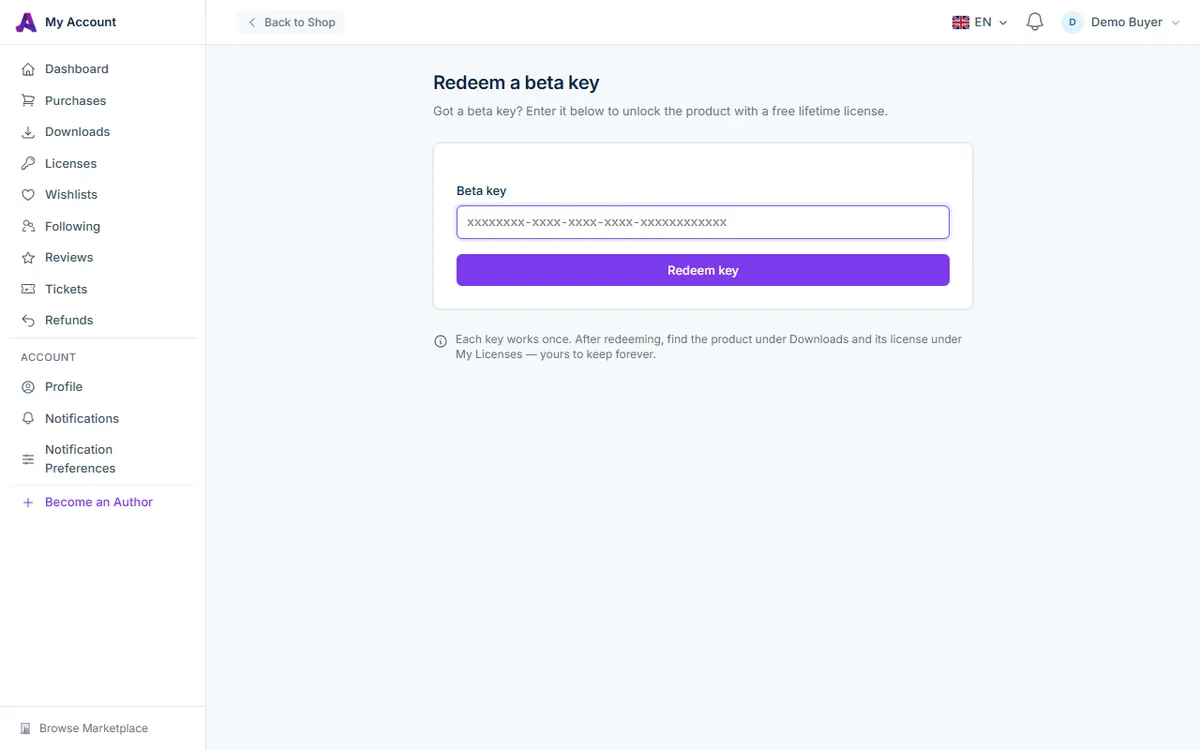
- Go to /account/redeem. The page is titled Redeem a beta key.
- Paste your key into the Beta key field. Keys look like
xxxxxxxx-xxxx-xxxx-xxxx-xxxxxxxxxxxx. Spaces before or after the key are ignored. - Click Redeem key.
When the key is accepted, you are taken to your Downloads page with a confirmation that the product is now yours for life.
What you get
- A perpetual Commercial License. Your beta key becomes the product's license key; it never expires and stays valid after the product leaves beta.
- One domain activation. A beta license can be activated on one domain. You can move it by deactivating the old domain first. See Managing Domain Activations.
- The product files under Downloads, including future versions as they are released.
- A $0 order under Purchases, so the product sits with the rest of your orders. No payment details are needed.
- The license under Licenses, where you can manage domain activations.
Help shape the product
Beta testers are the author's best source of feedback. Open the product page and use the Beta Feedback tab to report bugs or suggest improvements. You can attach a screenshot, follow the status of your reports, and edit or delete reports that are still open.
When the product leaves beta, reviews open and everyone who owns it, including key holders, receives an invitation to write a review. See Writing a Product Review.
Troubleshooting
"That beta key is not valid."
The key was not found. Copy it again directly from the message you received and make sure no characters are missing. Keys are not the same as coupon codes; coupon codes go in the cart, not on this page.
"That beta key has already been redeemed."
Someone else has already used this key. Each key works once, so keep yours private until you redeem it. Ask the person who gave you the key for a new one.
"You have already redeemed this key."
The key is already on your account. Look for the product under Downloads or Licenses.
"You already own this product."
A key can't be redeemed for a product you already have a license for, including a free copy claimed from the product page. Your existing license already gives you the files.
"This product is no longer available."
The product the key belongs to has been removed from the marketplace, so the key can no longer be redeemed.
Related articles
Was this article helpful?