

Managing Licenses for Your Products (Authors)
Every purchase or free claim of one of your products creates a license for the buyer. The Licenses page in the Author Panel lists all of them in one place, so you can confirm who owns a key, see where it's activated and check whether it's still active.
Open the Licenses page
In the Author Panel, click Licenses in the left sidebar, or go to /author/licenses. The page is titled Licenses for Your Products and shows the newest licenses first, 20 per page.
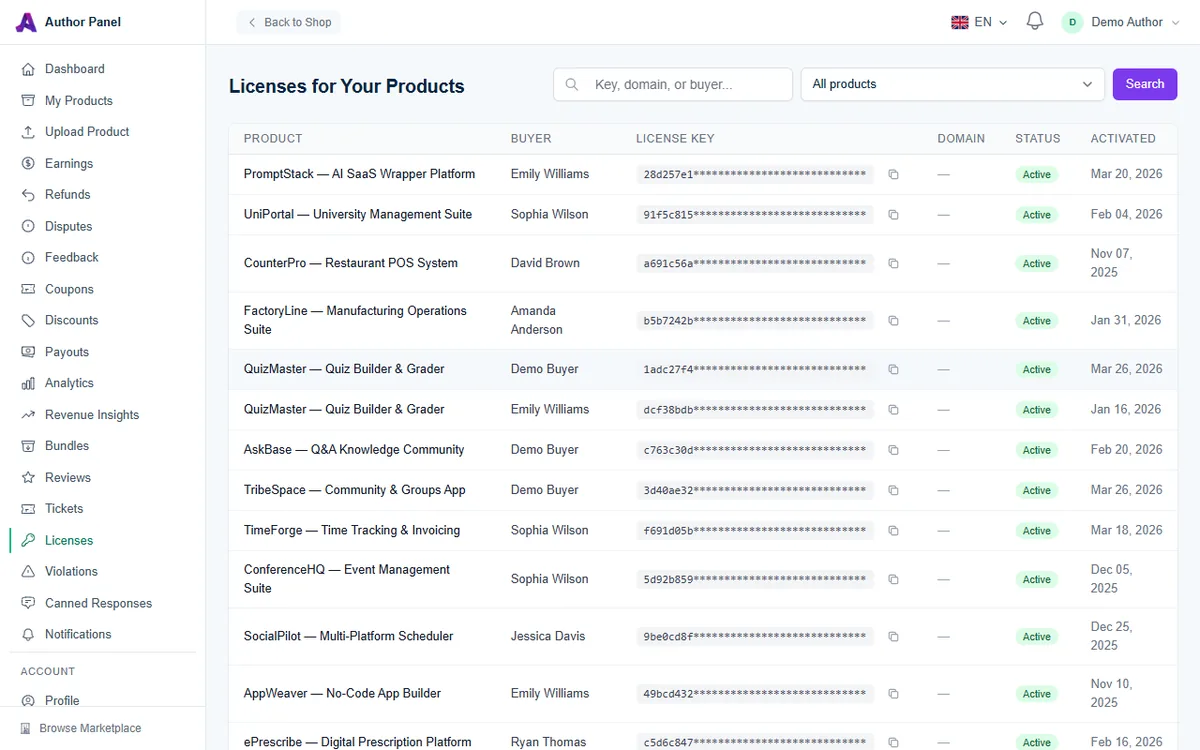
What each column shows
- Product: which of your products the license is for.
- Buyer: the name on the buyer's account.
- License Key: the first eight characters, with the rest masked. Click the copy icon to copy the full key, for example to check it against a support request.
- Domain: the domains currently active on the license, separated by commas, or a dash if none are active yet.
- Status: Active or Inactive.
- Activated: the date the license was issued.
Find a specific license
- Type in the Key, domain, or buyer... box. The search matches any part of a license key, an activated domain, or the buyer's name or email address.
- To narrow the list to one product, choose it from the All products dropdown.
- Click Search. Click Clear to return to the full list.
Domain search covers only domains that are currently active. A domain the buyer has since deactivated won't match.
Common tasks
Confirm a buyer before helping them
When someone asks for help in a ticket or comment, search for their email address or the key they gave you. A matching Active license for that product confirms they are a genuine buyer. For handling the conversation itself, see Answering Buyer Support Tickets.
Check where a key is being used
The Domain column shows the domains a key is currently active on. If a domain you don't recognize appears, or a key you never issued is being used somewhere, report it (see below).
Understand why a license is Inactive
A license becomes inactive when:
- The purchase was refunded.
- The buyer upgraded from your free Community edition to the Commercial License. The old Community license is replaced, and the new one appears as a separate, active row.
- An AppTrovo admin deactivated it, for example after a confirmed violation or because automatic abuse checks detected the key being used from an unusual number of domains or IP addresses.
Inactive keys fail verification, so the product stops validating on those installations.
What authors can and can't change
The Licenses page is read-only. Activation limits, domains and license status belong to the buyer and to AppTrovo:
- Buyers activate and deactivate their own domains from their account. If a buyer is stuck on "all activation slots are used", point them to Managing Domain Activations.
- Slot limits are fixed when a license is issued. The Commercial License has two slots by default. You set the Community edition's slot count in your product's pricing settings. See Offering Community and Commercial Editions.
- Deactivation for misuse is done by AppTrovo admins after a report.
Frequently asked questions
Why am I listed as a buyer of my own product?
That row is your developer test license, the one you generated on the product's detail page to test your installer. It verifies only on local domains. See API Tokens and the Sandbox License.
Why do some rows have no buyer?
If your product is in beta and you generated beta keys, any keys nobody has redeemed yet are listed without a buyer and without an Activated date. They get a buyer when someone redeems them.
Can I see licenses through the API?
Not through the License API. The authenticated /api/v1/licenses endpoint returns licenses your account owns as a buyer, not licenses sold for your products. Use this page instead.
Someone is using my product without a license. What do I do?
Open Violations in the sidebar and file a report with your evidence. See Reporting License Violations.
Related articles
Was this article helpful?