

Reporting License Violations
If you find your product being used without a valid license, resold or shared somewhere it shouldn't be, you can report it to AppTrovo from the Author Panel. An admin investigates every report, and you can follow its status on the same page.
Before you report
Gather what you know first. A report with clear evidence is much faster to act on.
- The URL or domain where your product is running or being offered.
- Screenshots that show your product, such as its interface, footer credits or code that matches your release.
- The license key, if you have one. Check it on your Licenses page first. Search for the domain or key to see whether it belongs to a real buyer and which domains it is active on.
Note that a buyer may legitimately run your product on two domains, for example staging and production, as long as both are activated on the same license.
Submit a report
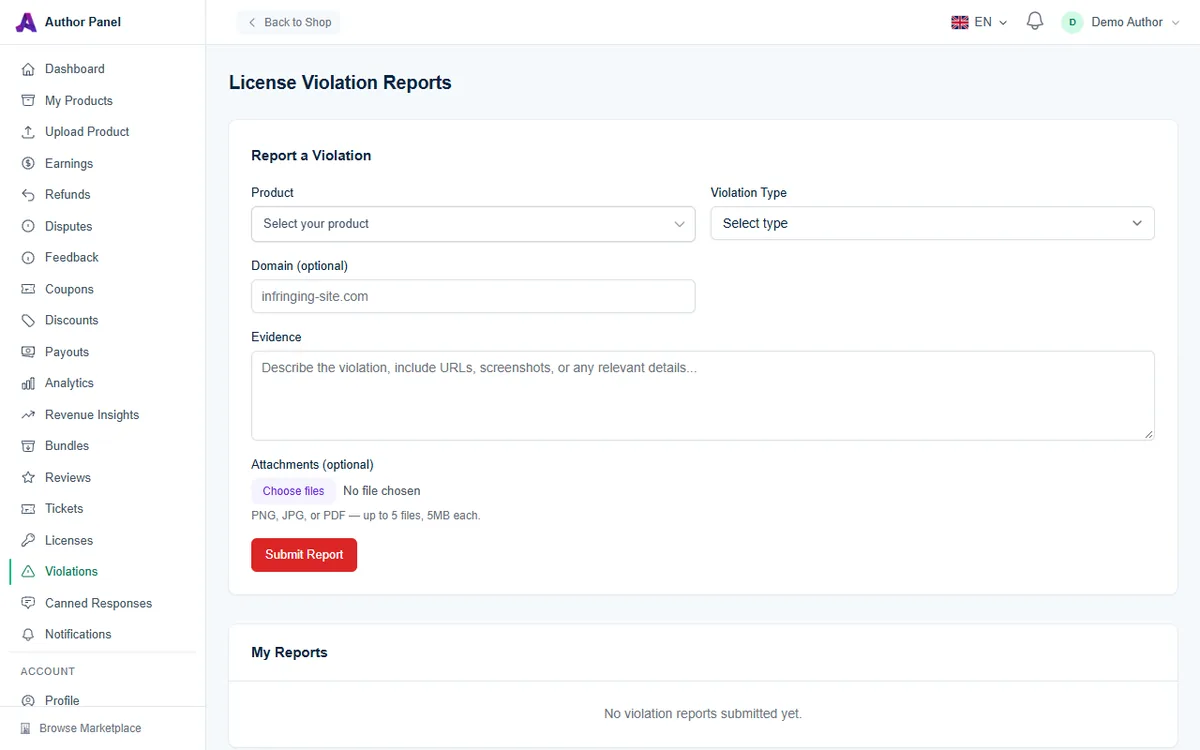
- In the Author Panel, click Violations in the left sidebar, or go to /author/violations.
- Under Report a Violation, open Product and choose the affected product. Type in Filter products... to narrow a long list. Only your own products are listed.
- Choose a Violation Type:
- Unauthorized Use: the product is running without a license.
- Domain Mismatch: a key is being used on a domain it shouldn't be.
- Redistribution: your code is being shared, resold or published elsewhere.
- Expired License Use: a time-limited key is still in use after it expired.
- Other: anything that doesn't fit the types above.
- Optionally enter the Domain involved, for example
infringing-site.com. - In Evidence, describe what you found. Include URLs, dates, the license key if you know it, and anything else that helps an admin confirm the problem. This field is required and holds up to 5,000 characters.
- Optionally add Attachments: PNG, JPG or PDF files, up to 5 files of 5 MB each.
- Click Submit Report.
A confirmation appears saying the report was submitted and an admin will investigate. The form then clears, ready for another report.
Track your reports
The My Reports table below the form lists everything you've submitted, 10 per page, with the Product, Type, Domain, Status and Reported date. Each report has one of these statuses:
- Reported: received and waiting for an admin.
- Under Review: an admin is investigating.
- Confirmed: the admin agreed it is a violation.
- Dismissed: the admin found no violation, or not enough evidence.
- Resolved: the case has been closed after action was taken.
Check this table to follow progress. If you find more evidence after submitting, file a new report that refers to the earlier one.
What AppTrovo can do
AppTrovo controls the licenses it issues. When a violation involves an AppTrovo license, admins can deactivate that license, and an inactive key fails verification in your product. Under the platform's license terms, violations can also lead to account suspension.
AppTrovo also scans license checks automatically every day and suspends keys that are verified from an unusual number of different domains or IP addresses, a common sign that a key has been shared or leaked. You don't need to report those cases. A report is still useful when you have evidence the scan can't see, such as a copy of your product being sold elsewhere.
AppTrovo can't remove content hosted on other websites. For copies published elsewhere, you may also need to contact that site or its hosting provider directly.
Frequently asked questions
Can buyers report violations?
This form is only for authors, and only for their own products. Anyone else who spots unauthorized use can email support@apptrovo.com or report the listing. See Reporting a Product or Abuse.
How do I protect my product in the first place?
Verify license keys in your installer with the License Verification API and send your product slug with each check. Without that check, AppTrovo can't stop an unlicensed copy from running.
Related articles
Was this article helpful?