

Offering Support Plans
Every paid product on AppTrovo can include a period of author support. You choose whether support is included and for how long; buyers can then add extra months when they buy, or extend support later from their account.
Turn on included support
The support setting lives with your pricing, so you set it when you create the product and can change it later.
- When creating a product, find the support option in step 1, Product Details. For an existing product, open My Products, click Edit on the product and switch to the Pricing tab.
- Tick Include buyer support.
- Choose the included period: 3 Months, 6 Months (Recommended) or 12 Months.
- Save the product.
The included period starts when the buyer's order completes and is stored on their license. It applies to the paid Commercial License edition. If you also offer a free Community edition, Community users get no author support; that stays exclusive to Commercial. See Offering Community and Commercial Editions.
What buyers can add at checkout
When support is included and the edition has a price, the product page shows a Support dropdown above the Add to Cart button. Buyers can keep the default (for example, "6 months included") or pick a longer plan. Each option shows the new total and the extra cost:
- 6 extra months, priced at 15% of the edition's list price.
- 12 extra months, priced at 25% of the edition's list price.
The extra months are added on top of your included period, and the add-on price becomes part of that cart line. A few rules apply:
- Plan prices are set by AppTrovo as a percentage of the price. You can't set your own plan prices.
- The add-on is always priced from the list price. A running sale or discount on the product doesn't lower it.
- Free products, free editions and products in the beta program don't offer paid support add-ons.
Because the add-on is part of the sale, it is split like any other sale: the platform fee (currently 10%) and Stripe processing fees are handled according to your payment settings.
Extending support after purchase
Buyers can buy more support at any time from their account. On the order page in Purchases they open Extend Support, which lists each product in the order that can be extended with its support status: active, Expired with the date it ended, or Not included when no support period came with the purchase. Community and free-edition lines aren't offered extensions.
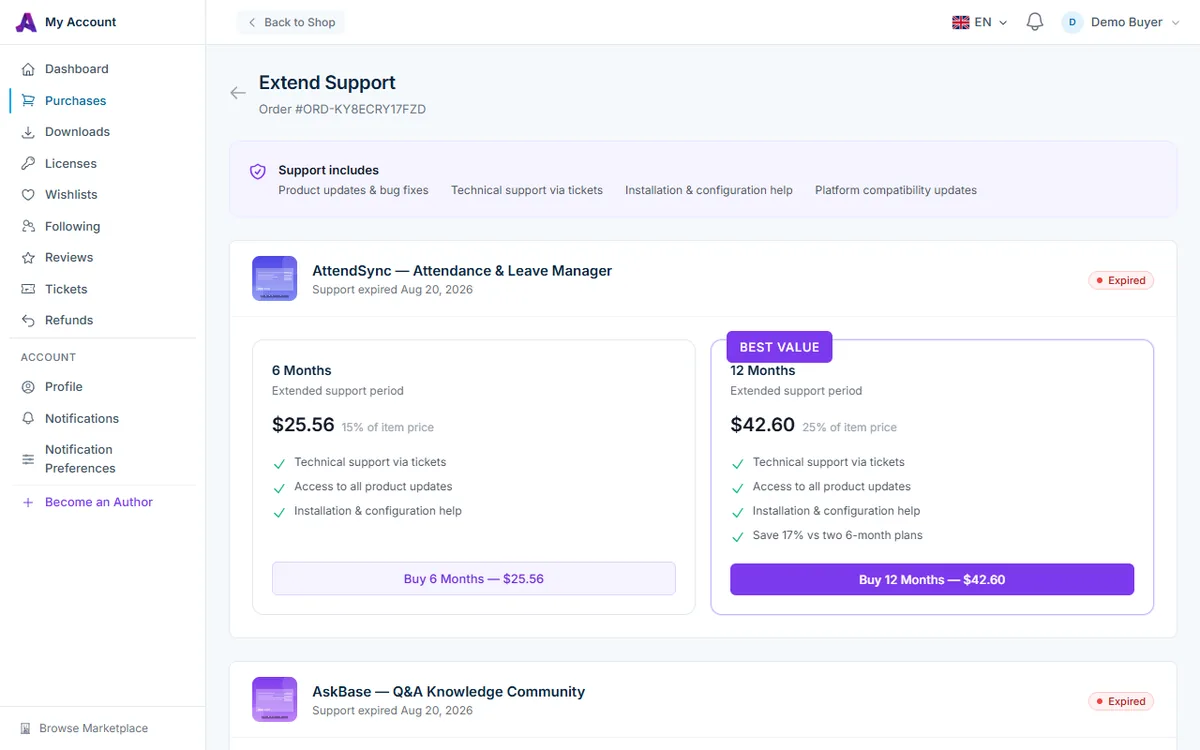
Two plans are offered:
- 6 Months at 15% of the item price.
- 12 Months at 25% of the item price, labelled Best Value.
The page tells buyers that support includes product updates and bug fixes, technical support via tickets, installation and configuration help, and platform compatibility updates, so be ready to deliver those during the support period. Buyers pay through Stripe Checkout. If their current support is still running, the new months are added to the end of it; if it has expired, the new period starts on the day they pay. The buyer-side steps are described in Extending Product Support.
How you are paid for support extensions
- You receive 90% of the extension price. The platform fee is currently 10%, and AppTrovo covers the Stripe processing fee on support extensions, so nothing else is deducted.
- If your Stripe Connect account is active, your share is sent to your Stripe account with the payment. Otherwise it is added to your AppTrovo balance and follows the normal hold period. See Understanding Payouts.
- Extension income appears on the Earnings page with a Support tag next to the product name.
- If an extension is refunded, the matching earning is reversed and the Stripe processing fee is deducted from your next payout.
Frequently asked questions
Can I change the included period later?
Yes. Change it on the Pricing tab. New purchases get the new period, and existing buyers keep the support end date already on their license.
Do buyers need active support to get help?
Support is what buyers pay for when they choose your product, so answer tickets from buyers whose support is active. When a buyer's support has expired, point them to Extend Support in their account.
Where do I answer support questions?
Tickets that buyers open about your products appear under Tickets in the Author Panel. See Answering Buyer Support Tickets.
Related articles
Was this article helpful?