

System Requirements
There are two sets of requirements to think about: what you need to use the AppTrovo marketplace, and what your server needs to run the app you buy. The first is simple; the second depends on the product, so always confirm it on the product page before you purchase.
Using the AppTrovo website
- A current version of a modern browser such as Chrome, Firefox, Safari or Edge.
- JavaScript enabled. Search, the cart, the product tabs and your account pages all rely on it.
- Cookies enabled, so you stay signed in and your cart is remembered.
Nothing needs to be installed to browse, buy or download. Downloaded files are usually ZIP archives, which every desktop operating system can open.
Where each product lists its requirements
Every app is built and supported by its author, so requirements differ from product to product. Before you buy, check these parts of the product page:
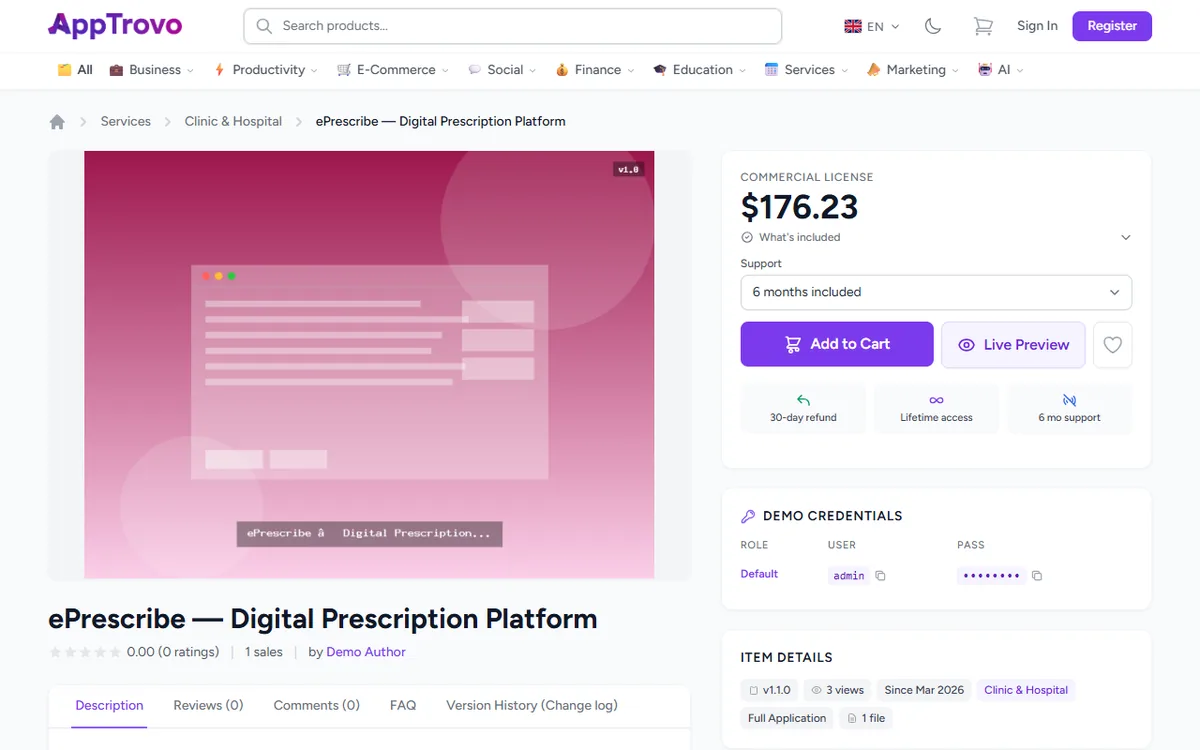
- Description tab: authors list server requirements, supported versions and installation notes here.
- Item Details card: the current version, the product type (for example Full Application or Mobile App), the category and the number of files.
- Tech Stack card (when the author has filled it in): the Tech Stack (such as Laravel, Vue or Node.js), the supported Database options and the Deployment targets (such as Docker, cPanel or Self-hosted). It also shows whether Documentation Included and Demo Available apply.
- Live Preview and Demo Credentials (when the author provides them): try the running app before you buy.
- FAQ and Version History (Change log) tabs: common questions and recent changes, which can mention new requirements.
- Comments tab: if something is unclear, sign in and ask the author before buying.
Typical server requirements for PHP and Laravel apps
Many products are Laravel applications. If the product page does not say otherwise, a typical installation needs:
- PHP: the version the product states. Recent Laravel releases need PHP 8.2 or newer, and the newest need 8.3.
- Composer 2, unless the download already includes the
vendorfolder. - Database: usually MySQL or MariaDB, PostgreSQL or SQLite, as listed in the product's Database attribute.
- Web server: Apache with
mod_rewrite, or Nginx, with the document root pointing at the app'spublicfolder. - HTTPS: a valid TLS certificate for production. Payment, login and API features often require it.
- Cron and a queue worker if the app sends email, runs imports or has scheduled tasks.
- Node.js and npm (a current LTS release) only if you need to build front-end assets yourself.
Common PHP extensions
Laravel itself needs Ctype, cURL, DOM, Fileinfo, Filter, Hash, Mbstring, OpenSSL, PCRE, PDO, Session, Tokenizer and XML. Apps commonly add BCMath, Intl, Zip, GD or Imagick, and the PDO driver for your database (pdo_mysql or pdo_pgsql). Redis is optional unless the product requires it for caching or queues.
Shared hosting or a server?
Small apps can run on shared hosting that offers SSH access, a recent PHP version and a way to set the document root. Apps that need queue workers, WebSockets, Redis or Docker usually need a VPS or cloud server. The Deployment attribute shows what the author supports.
Node.js apps
Node.js products list the Node.js version they need. Expect to install dependencies with npm, set environment variables, build if required, and keep the app running with a process manager such as PM2 or systemd behind a reverse proxy like Nginx.
Mobile apps
Mobile products, such as Flutter or React Native apps, are delivered as source code. To build and publish them you need the matching SDK, Android Studio and, for iOS, a Mac with Xcode, plus your own developer accounts with Apple and Google. Many mobile apps also need a backend, which has its own server requirements.
A quick pre-purchase checklist
- Your hosting supports the PHP or Node.js version the product needs.
- Your database is one of the supported options.
- You can set up cron jobs and workers if the app needs them.
- You have tried the Live Preview, if one is offered.
- You know whether documentation is included and how long support lasts.
Frequently asked questions
The product page does not list requirements. What should I do?
Ask the author on the product's Comments tab before buying. Their answer is public, so it helps other buyers too.
I bought an app and my server cannot run it.
Ask the author first; there may be a workaround. If the product cannot work as described, see Requesting a Refund.
Related articles
Was this article helpful?